

Simbroidery Special Effect
Unlock an embroidered appearance for your apparel without ever needing a sewing machine. Transfer Express’s Simbroidery effect transforms your digital artwork into a faux-embroidery finish.
Simbroidery - Add a Simulated Embroidery Look
With the Simbroidery effect, realistic looking stitches give a clean embroidered appearance to your artwork. Simbroidery is a perfect effect for hats, small chest logos, jackets, and bags. It is a visual faux effect only. There are no textured stitches added.
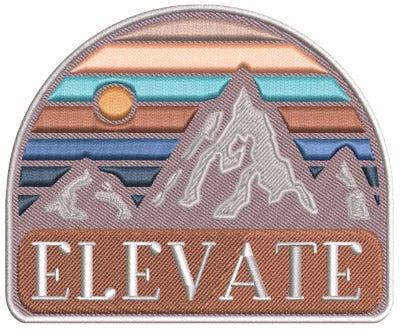
Simbroidery can be added to any full color transfer type including:
- UltraColor® Max direct to film transfers
- UltraColor® Pro
- UltraColor® Stretch (and Stretch with Blocker)
Cost of Simbroidery
Adding Simbroidery has no added cost to your digital artwork or digital transfers for UltraColor Pro or UltraColor Stretch.
However, for UltraColor Max direct to film transfers, a proof is required for $26. A proof will be ready on the normal proof turnaround time of next business day when ordered by 1 pm ET. Follow the instructions like all other proofs.
Simbroidery Artwork Guidelines
Like embroidery, artwork that is more simple with larger text will convert better to the simulated stitches.
- Simbroidery works best with vector artwork. Bitmaps may need to be redrawn for best results which would delay the order. No less than 300dpi for bitmap images.
- Solid colors only - no fades or gradients
- No distressed artwork
- No photographs
- No artwork with fine detail. The detail will print but have little of the Simbroidery effect.
- Text should be a minimum of 18pt (approx. 0.185” height). Text that is too small will not be readable.
- Minimum line thickness is .018”
- Minimum show through thickness is .03”
- Image prints in full color (CMYK) and may not match original colors exactly. Exact PMS or color matches may not be attainable
- No metallic or fluorescent colors available
- No gang sheets - single images only (UltraColor Max will need to be single image per order. For UltraColor Pro and Stretch, you can have multiple copies of the same image and same size on a sheet and use Simbroidery. Or, on a gang sheet with different images/sizes, you can have one of the images with the Simbroidery effect.)
How to Add Simbroidery to Your Transfers
When using Easy View Online Designer:
1. First choose a full color transfer type for the Print Method in the lower left corner

2. Next, click on the "Options" tab at the top of the designer
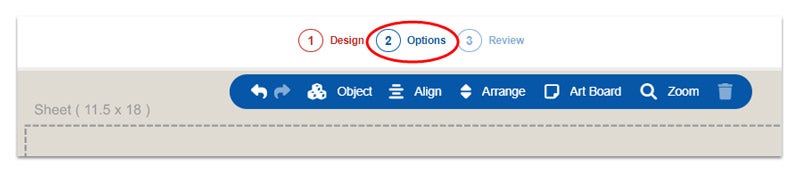
3. To choose Simbroidery, click on the slider option so that it turns green
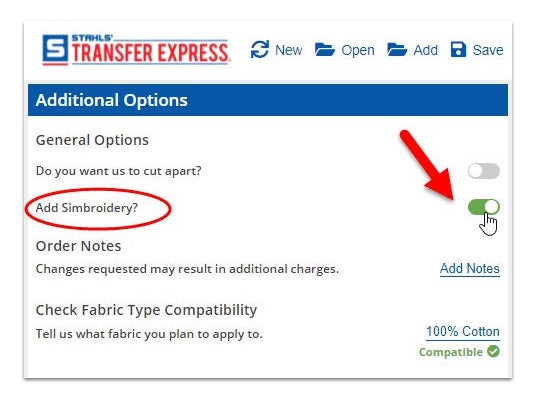
If you are utilizing a gang sheet, add a note in the "Order Notes" section for which image on the sheet you would like the Simbroidery effect (Simbroidery effect on single image only).
Get a Free Sample
Get a free Simbroidery sample transfer to see it for yourself. The sample uses the UltraColor Pro transfer type.
Add Free Simbroidery Sample to Cart