

Learn More About Goof Proof® Single Image Screen Printed Transfers
What Is Single Image?
Single Image screen printed transfers are available in two transfer types: Goof Proof® and Goof Proof® Premium. They both give you the same trusted quality but tailored specifically for when you need many of the same image. No need to pay for an entire gang sheet.
Single Image is perfect for single-color, high-volume orders, making it easier and more profitable to print custom designs for schools, businesses, and events.
- 2 Sheet sizes: 12.75" x 9" or 11" x 14"
- One image only
- Minimum 25 sheet order
- Single color
- Easy Prints® and Vector pricing; Non-vector must be a Proof order first
- 34 color options to choose from: Black, Bubblegum Pink, Carolina Blue, Cement, Charcoal, Columbia Blue, Dark Brown, Dark Green, Gold, Gray, Kelly Green, Maize, Maroon, Metallic Gold, Metallic Graphite, Metallic Silver, Mid Blue, Midnight Blue, Navy Blue, Neon Blue, Neon Green, Neon Orange, Neon Pink, Neon Yellow, Orange, Purple, Red, Royal Blue, Tennessee Orange, Texas Orange, Vegas Gold, White, Yellow (Transparent for Goof Proof® Premium only)
- No color changes
- No custom color matches
- No rushes available
Get Free Goof Proof Sample Get Free Goof Proof Premium Sample



Goof Proof®
- Printed on a paper carrier for most cost-effective option
- Fastest application: 4-6 seconds
- 365°F application temperature
- Hot peel
- Gang sheets available in Easy View® online designer
- Single color (33 stock color options to choose from)
Transfer Types:
- Goof Proof® (Gang Sheets and Single Image)
- Goof Proof® Premium (Gang Sheets and Single Image)
- Hot Split Retro
- Elasti Prints®
- Puff
- AquaTru®
- UltraColor Max™
- UltraColor Pro™
- UltraColor Stretch™ (with or without blocker)
Transfer Types:
- Goof Proof® (Gang Sheets and Single Image)
- Goof Proof® Premium (Gang Sheets and Single Image)
- Hot Split Retro
- Elasti Prints®
- Puff
- AquaTru®
- UltraColor Max™
- UltraColor Pro™
- UltraColor Stretch™ (with or without blocker)
Transfer Types:
- Goof Proof® (Gang Sheets and Single Image)
- Goof Proof® Premium (Gang Sheets and Single Image)
- Hot Split Retro
- Elasti Prints®
- Puff
- AquaTru®
- UltraColor Max™
- UltraColor Pro™
- UltraColor Stretch™ (with or without blocker)
PMS:
2330C
Transfer Types:
- Goof Proof® (Gang Sheets and Single Image)
- Goof Proof® Premium (Gang Sheets and Single Image)
- Hot Split Retro
- Elasti Prints®
- AquaTru®
PMS:
877C
Transfer Types:
- Goof Proof® (Gang Sheets and Single Image)
- Goof Proof® Premium (Gang Sheets and Single Image)
- Hot Split Retro
- Elasti Prints®
- Puff
- AquaTru®
- UltraColor Max™
- UltraColor Pro™
- UltraColor Stretch™ (with or without blocker)
PMS:
423C
Transfer Types:
- Goof Proof® (Gang Sheets and Single Image)
- Goof Proof® Premium (Gang Sheets and Single Image)
- Hot Split Retro
- Elasti Prints®
- Puff
- AquaTru®
- UltraColor Max™
- UltraColor Pro™
- UltraColor Stretch™ (with or without blocker)
PMS:
7540C
Transfer Types:
- Goof Proof® (Gang Sheets and Single Image)
- Goof Proof® Premium (Gang Sheets and Single Image)
- Hot Split Retro
- Elasti Prints®
Transfer Types:
- Goof Proof® (Gang Sheets and Single Image)
- Goof Proof® Premium (Gang Sheets and Single Image)
- Hot Split Retro
- Elasti Prints®
- Puff
Transfer Types:
- Goof Proof® (Gang Sheets and Single Image)
- Goof Proof® Premium (Gang Sheets and Single Image)
- Hot Split Retro
- Elasti Prints®
- Puff
- AquaTru®
- UltraColor Max™
- UltraColor Pro™
- UltraColor Stretch™ (with or without blocker)
PMS:
186C
Transfer Types:
- Goof Proof® (Gang Sheets and Single Image)
- Goof Proof® Premium (Gang Sheets and Single Image)
- Hot Split Retro
- Elasti Prints®
- Puff
- AquaTru®
- UltraColor Max™
- UltraColor Pro™
- UltraColor Stretch™ (with or without blocker)
PMS:
7421C
Transfer Types:
- Goof Proof® (Gang Sheets and Single Image)
- Goof Proof® Premium (Gang Sheets and Single Image)
- Hot Split Retro
- Elasti Prints®
- Puff
- AquaTru®
- UltraColor Max™
- UltraColor Pro™
- UltraColor Stretch™ (with or without blocker)
PMS:
1495C
Transfer Types:
- Goof Proof® (Gang Sheets and Single Image)
- Goof Proof® Premium (Gang Sheets and Single Image)
- Hot Split Retro
- Elasti Prints®
- Puff
- AquaTru®
- UltraColor Max™
- UltraColor Pro™
- UltraColor Stretch™ (with or without blocker)
PMS:
172C
Transfer Types:
- Goof Proof® (Gang Sheets and Single Image)
- Goof Proof® Premium (Gang Sheets and Single Image)
- Hot Split Retro
- Elasti Prints®
- Puff
- AquaTru®
- UltraColor Max™
- UltraColor Pro™
- UltraColor Stretch™ (with or without blocker)
PMS:
2019C
Transfer Types:
- Goof Proof® (Gang Sheets and Single Image)
- Goof Proof® Premium (Gang Sheets and Single Image)
- Hot Split Retro
- Elasti Prints®
- Puff
- UltraColor Max™
- UltraColor Pro™
- UltraColor Stretch™ (with or without blocker)
PMS:
4104C
Transfer Types:
- Goof Proof® (Gang Sheets and Single Image)
- Goof Proof® Premium (Gang Sheets and Single Image)
- Hot Split Retro
- Elasti Prints®
- Puff
- AquaTru®
- UltraColor Max™
- UltraColor Pro™
- UltraColor Stretch™ (with or without blocker)
PMS:
108C
Transfer Types:
- Goof Proof® (Gang Sheets and Single Image)
- Goof Proof® Premium (Gang Sheets and Single Image)
- Hot Split Retro
- Elasti Prints®
- Puff
- AquaTru®
- UltraColor Max™
- UltraColor Pro™
- UltraColor Stretch™ (with or without blocker)
PMS:
1225C
Transfer Types:
- Goof Proof® (Gang Sheets and Single Image)
- Goof Proof® Premium (Gang Sheets and Single Image)
- Hot Split Retro
- Elasti Prints®
- Puff
- AquaTru®
- UltraColor Max™
- UltraColor Pro™
- UltraColor Stretch™ (with or without blocker)
PMS:
1235C
Transfer Types:
- Goof Proof® (Gang Sheets and Single Image)
- Goof Proof® Premium (Gang Sheets and Single Image)
- Hot Split Retro
- Elasti Prints®
- AquaTru®
Transfer Types:
- Goof Proof® (Gang Sheets and Single Image)
- Goof Proof® Premium (Gang Sheets and Single Image)
- Hot Split Retro
- Elasti Prints®
- Puff
- AquaTru®
- UltraColor Max™
- UltraColor Pro™
- UltraColor Stretch™ (with or without blocker)
PMS:
451C
Transfer Types:
- Goof Proof® (Gang Sheets and Single Image)
- Goof Proof® Premium (Gang Sheets and Single Image)
- Hot Split Retro
- Elasti Prints®
- Puff
- AquaTru®
- UltraColor Max™
- UltraColor Pro™
- UltraColor Stretch™ (with or without blocker)
PMS:
348C
Transfer Types:
- Goof Proof® (Gang Sheets and Single Image)
- Goof Proof® Premium (Gang Sheets and Single Image)
- Hot Split Retro
- Elasti Prints®
- Puff
- AquaTru®
- UltraColor Max™
- UltraColor Pro™
- UltraColor Stretch™ (with or without blocker)
PMS:
357C
Transfer Types:
- Goof Proof® (Gang Sheets and Single Image)
- Goof Proof® Premium (Gang Sheets and Single Image)
- Hot Split Retro
- Elasti Prints®
- Puff
- AquaTru®
- UltraColor Max™
- UltraColor Pro™
- UltraColor Stretch™ (with or without blocker)
PMS:
2128C
Transfer Types:
- Goof Proof® (Gang Sheets and Single Image)
- Goof Proof® Premium (Gang Sheets and Single Image)
- Hot Split Retro
- Elasti Prints®
- Puff
- AquaTru®
- UltraColor Max™
- UltraColor Pro™
- UltraColor Stretch™ (with or without blocker)
PMS:
300C
Transfer Types:
- Goof Proof® (Gang Sheets and Single Image)
- Goof Proof® Premium (Gang Sheets and Single Image)
- Hot Split Retro
- Elasti Prints®
- Puff
- AquaTru®
- UltraColor Max™
- UltraColor Pro™
- UltraColor Stretch™ (with or without blocker)
PMS:
2129C
Transfer Types:
- Goof Proof® (Gang Sheets and Single Image)
- Goof Proof® Premium (Gang Sheets and Single Image)
- Hot Split Retro
- Elasti Prints®
- Puff
- AquaTru®
- UltraColor Max™
- UltraColor Pro™
- UltraColor Stretch™ (with or without blocker)
PMS:
7686C
Transfer Types:
- Goof Proof® (Gang Sheets and Single Image)
- Goof Proof® Premium (Gang Sheets and Single Image)
- Hot Split Retro
- Elasti Prints®
- Puff
- AquaTru®
- UltraColor Max™
- UltraColor Pro™
- UltraColor Stretch™ (with or without blocker)
PMS:
7693C
Transfer Types:
- Goof Proof® (Gang Sheets and Single Image)
- Goof Proof® Premium (Gang Sheets and Single Image)
- Hot Split Retro
- Elasti Prints®
- Puff
- AquaTru®
- UltraColor Max™
- UltraColor Pro™
- UltraColor Stretch™ (with or without blocker)
PMS:
2380C
Transfer Types:
- Goof Proof® (Gang Sheets and Single Image)
- Goof Proof® Premium (Gang Sheets and Single Image)
- Hot Split Retro
- Elasti Prints®
- Puff
- AquaTru®
- UltraColor Max™
- UltraColor Pro™
- UltraColor Stretch™ (with or without blocker)
PMS:
3566C
Transfer Types:
- Goof Proof® (Gang Sheets and Single Image)
- Goof Proof® Premium (Gang Sheets and Single Image)
- Hot Split Retro
- Elasti Prints®
- Puff
PMS:
2195C
Transfer Types:
- Goof Proof® (Gang Sheets and Single Image)
- Goof Proof® Premium (Gang Sheets and Single Image)
- Hot Split Retro
- Elasti Prints®
- Puff
Transfer Types:
- Goof Proof® (Gang Sheets and Single Image)
- Goof Proof® Premium (Gang Sheets and Single Image)
- Hot Split Retro
- Elasti Prints®
- Puff
Transfer Types:
- Goof Proof® (Gang Sheets and Single Image)
- Goof Proof® Premium (Gang Sheets and Single Image)
- Hot Split Retro
- Elasti Prints®
- Puff
Note:
Neon Orange is only recommended to be applied to white colored fabric or needs to be outline in white.
Transfer Types:
- Goof Proof® (Gang Sheets and Single Image)
- Goof Proof® Premium (Gang Sheets and Single Image)
- Hot Split Retro
- Elasti Prints®
- Puff
- AquaTru®
Goof Proof® Premium
- Printed on a clear carrier for easy alignment and placement
- 10 second application time
- Applies at a lower temperature: 320°F
- Hot peel
- Maximum detail reproduction
- Gang sheets available in Easy View® online designer
- Single color (34 stock color options to choose from)
Transfer Types:
- Goof Proof® (Gang Sheets and Single Image)
- Goof Proof® Premium (Gang Sheets and Single Image)
- Hot Split Retro
- Elasti Prints®
- Puff
- AquaTru®
- UltraColor Max™
- UltraColor Pro™
- UltraColor Stretch™ (with or without blocker)
Transfer Types:
- Goof Proof® (Gang Sheets and Single Image)
- Goof Proof® Premium (Gang Sheets and Single Image)
- Hot Split Retro
- Elasti Prints®
- Puff
- AquaTru®
- UltraColor Max™
- UltraColor Pro™
- UltraColor Stretch™ (with or without blocker)
Transfer Types:
- Goof Proof® (Gang Sheets and Single Image)
- Goof Proof® Premium (Gang Sheets and Single Image)
- Hot Split Retro
- Elasti Prints®
- Puff
- AquaTru®
- UltraColor Max™
- UltraColor Pro™
- UltraColor Stretch™ (with or without blocker)
PMS:
2330C
Transfer Types:
- Goof Proof® (Gang Sheets and Single Image)
- Goof Proof® Premium (Gang Sheets and Single Image)
- Hot Split Retro
- Elasti Prints®
- AquaTru®
PMS:
877C
Transfer Types:
- Goof Proof® (Gang Sheets and Single Image)
- Goof Proof® Premium (Gang Sheets and Single Image)
- Hot Split Retro
- Elasti Prints®
- Puff
- AquaTru®
- UltraColor Max™
- UltraColor Pro™
- UltraColor Stretch™ (with or without blocker)
PMS:
423C
Transfer Types:
- Goof Proof® (Gang Sheets and Single Image)
- Goof Proof® Premium (Gang Sheets and Single Image)
- Hot Split Retro
- Elasti Prints®
- Puff
- AquaTru®
- UltraColor Max™
- UltraColor Pro™
- UltraColor Stretch™ (with or without blocker)
PMS:
7540C
Transfer Types:
- Goof Proof® (Gang Sheets and Single Image)
- Goof Proof® Premium (Gang Sheets and Single Image)
- Hot Split Retro
- Elasti Prints®
Transfer Types:
- Goof Proof® (Gang Sheets and Single Image)
- Goof Proof® Premium (Gang Sheets and Single Image)
- Hot Split Retro
- Elasti Prints®
- Puff
Transfer Types:
- Goof Proof® (Gang Sheets and Single Image)
- Goof Proof® Premium (Gang Sheets and Single Image)
- Hot Split Retro
- Elasti Prints®
- Puff
- AquaTru®
- UltraColor Max™
- UltraColor Pro™
- UltraColor Stretch™ (with or without blocker)
PMS:
186C
Transfer Types:
- Goof Proof® (Gang Sheets and Single Image)
- Goof Proof® Premium (Gang Sheets and Single Image)
- Hot Split Retro
- Elasti Prints®
- Puff
- AquaTru®
- UltraColor Max™
- UltraColor Pro™
- UltraColor Stretch™ (with or without blocker)
PMS:
7421C
Transfer Types:
- Goof Proof® (Gang Sheets and Single Image)
- Goof Proof® Premium (Gang Sheets and Single Image)
- Hot Split Retro
- Elasti Prints®
- Puff
- AquaTru®
- UltraColor Max™
- UltraColor Pro™
- UltraColor Stretch™ (with or without blocker)
PMS:
1495C
Transfer Types:
- Goof Proof® (Gang Sheets and Single Image)
- Goof Proof® Premium (Gang Sheets and Single Image)
- Hot Split Retro
- Elasti Prints®
- Puff
- AquaTru®
- UltraColor Max™
- UltraColor Pro™
- UltraColor Stretch™ (with or without blocker)
PMS:
172C
Transfer Types:
- Goof Proof® (Gang Sheets and Single Image)
- Goof Proof® Premium (Gang Sheets and Single Image)
- Hot Split Retro
- Elasti Prints®
- Puff
- AquaTru®
- UltraColor Max™
- UltraColor Pro™
- UltraColor Stretch™ (with or without blocker)
PMS:
2019C
Transfer Types:
- Goof Proof® (Gang Sheets and Single Image)
- Goof Proof® Premium (Gang Sheets and Single Image)
- Hot Split Retro
- Elasti Prints®
- Puff
- UltraColor Max™
- UltraColor Pro™
- UltraColor Stretch™ (with or without blocker)
PMS:
4104C
Transfer Types:
- Goof Proof® (Gang Sheets and Single Image)
- Goof Proof® Premium (Gang Sheets and Single Image)
- Hot Split Retro
- Elasti Prints®
- Puff
- AquaTru®
- UltraColor Max™
- UltraColor Pro™
- UltraColor Stretch™ (with or without blocker)
PMS:
108C
Transfer Types:
- Goof Proof® (Gang Sheets and Single Image)
- Goof Proof® Premium (Gang Sheets and Single Image)
- Hot Split Retro
- Elasti Prints®
- Puff
- AquaTru®
- UltraColor Max™
- UltraColor Pro™
- UltraColor Stretch™ (with or without blocker)
PMS:
1225C
Transfer Types:
- Goof Proof® (Gang Sheets and Single Image)
- Goof Proof® Premium (Gang Sheets and Single Image)
- Hot Split Retro
- Elasti Prints®
- Puff
- AquaTru®
- UltraColor Max™
- UltraColor Pro™
- UltraColor Stretch™ (with or without blocker)
PMS:
1235C
Transfer Types:
- Goof Proof® (Gang Sheets and Single Image)
- Goof Proof® Premium (Gang Sheets and Single Image)
- Hot Split Retro
- Elasti Prints®
- AquaTru®
Transfer Types:
- Goof Proof® (Gang Sheets and Single Image)
- Goof Proof® Premium (Gang Sheets and Single Image)
- Hot Split Retro
- Elasti Prints®
- Puff
- AquaTru®
- UltraColor Max™
- UltraColor Pro™
- UltraColor Stretch™ (with or without blocker)
PMS:
451C
Transfer Types:
- Goof Proof® (Gang Sheets and Single Image)
- Goof Proof® Premium (Gang Sheets and Single Image)
- Hot Split Retro
- Elasti Prints®
- Puff
- AquaTru®
- UltraColor Max™
- UltraColor Pro™
- UltraColor Stretch™ (with or without blocker)
PMS:
348C
Transfer Types:
- Goof Proof® (Gang Sheets and Single Image)
- Goof Proof® Premium (Gang Sheets and Single Image)
- Hot Split Retro
- Elasti Prints®
- Puff
- AquaTru®
- UltraColor Max™
- UltraColor Pro™
- UltraColor Stretch™ (with or without blocker)
PMS:
357C
Transfer Types:
- Goof Proof® (Gang Sheets and Single Image)
- Goof Proof® Premium (Gang Sheets and Single Image)
- Hot Split Retro
- Elasti Prints®
- Puff
- AquaTru®
- UltraColor Max™
- UltraColor Pro™
- UltraColor Stretch™ (with or without blocker)
PMS:
2128C
Transfer Types:
- Goof Proof® (Gang Sheets and Single Image)
- Goof Proof® Premium (Gang Sheets and Single Image)
- Hot Split Retro
- Elasti Prints®
- Puff
- AquaTru®
- UltraColor Max™
- UltraColor Pro™
- UltraColor Stretch™ (with or without blocker)
PMS:
300C
Transfer Types:
- Goof Proof® (Gang Sheets and Single Image)
- Goof Proof® Premium (Gang Sheets and Single Image)
- Hot Split Retro
- Elasti Prints®
- Puff
- AquaTru®
- UltraColor Max™
- UltraColor Pro™
- UltraColor Stretch™ (with or without blocker)
PMS:
2129C
Transfer Types:
- Goof Proof® (Gang Sheets and Single Image)
- Goof Proof® Premium (Gang Sheets and Single Image)
- Hot Split Retro
- Elasti Prints®
- Puff
- AquaTru®
- UltraColor Max™
- UltraColor Pro™
- UltraColor Stretch™ (with or without blocker)
PMS:
7686C
Transfer Types:
- Goof Proof® (Gang Sheets and Single Image)
- Goof Proof® Premium (Gang Sheets and Single Image)
- Hot Split Retro
- Elasti Prints®
- Puff
- AquaTru®
- UltraColor Max™
- UltraColor Pro™
- UltraColor Stretch™ (with or without blocker)
PMS:
7693C
Transfer Types:
- Goof Proof® (Gang Sheets and Single Image)
- Goof Proof® Premium (Gang Sheets and Single Image)
- Hot Split Retro
- Elasti Prints®
- Puff
- AquaTru®
- UltraColor Max™
- UltraColor Pro™
- UltraColor Stretch™ (with or without blocker)
PMS:
2380C
Transfer Types:
- Goof Proof® (Gang Sheets and Single Image)
- Goof Proof® Premium (Gang Sheets and Single Image)
- Hot Split Retro
- Elasti Prints®
- Puff
- AquaTru®
- UltraColor Max™
- UltraColor Pro™
- UltraColor Stretch™ (with or without blocker)
PMS:
3566C
Transfer Types:
- Goof Proof® (Gang Sheets and Single Image)
- Goof Proof® Premium (Gang Sheets and Single Image)
- Hot Split Retro
- Elasti Prints®
- Puff
PMS:
2195C
Transfer Types:
- Goof Proof® (Gang Sheets and Single Image)
- Goof Proof® Premium (Gang Sheets and Single Image)
- Hot Split Retro
- Elasti Prints®
- Puff
Transfer Types:
- Goof Proof® (Gang Sheets and Single Image)
- Goof Proof® Premium (Gang Sheets and Single Image)
- Hot Split Retro
- Elasti Prints®
- Puff
Transfer Types:
- Goof Proof® (Gang Sheets and Single Image)
- Goof Proof® Premium (Gang Sheets and Single Image)
- Hot Split Retro
- Elasti Prints®
- Puff
Note:
Neon Orange is only recommended to be applied to white colored fabric or needs to be outline in white.
Transfer Types:
- Goof Proof® (Gang Sheets and Single Image)
- Goof Proof® Premium (Gang Sheets and Single Image)
- Hot Split Retro
- Elasti Prints®
- Puff
- AquaTru®
Transfer Types:
- Goof Proof® Premium (Gang Sheets and Single Image)
| Easy Prints® or Vector | 25-49 | 50-99 | 100-149 | 150-299 | 300-499 | 500+ |
| SMALL (9" x 12.75") | 2.05 | 0.99 | 0.85 | 0.75 | 0.45 | 0.30 |
| LARGE (11" x 14") | 2.45 | 1.25 | 1.15 | 0.95 | 0.75 | 0.50 |
Pricing per image (USD)
| Easy Prints® or Vector | 25-49 | 50-99 | 100-149 | 150-299 | 300-499 | 500+ |
| SMALL (9" x 12.75") | 3.25 | 1.75 | 1.45 | 1.05 | 0.85 | 0.75 |
| LARGE (11" x 14") | 3.90 | 1.95 | 1.75 | 1.35 | 1.25 | 1.15 |
Pricing is in USD per image
Order Single Image transfers by 1 pm ET and your order will ship the very next business day!
Flat rate $15 shipping on all custom transfer orders.
All custom transfers arrive in 2 days or less using UPS Ground, to the 48 contiguous states.
Outside of 2 day ground service? We'll upgrade you to our Speedy Air at no extra charge, so you'll still receive your package in 2 days!
Screen printed transfers require vector artwork.
You can send us vector artwork and we can print it as is or with adjustments.
You can send us raster (non-vector) artwork that we will redraw/convert to vector.
Send us the best artwork that you have.
.AI, .JPE, .JPEG, .JPG, .PDF, .PNG, .PSD, .SVG, .TIF, and .TIFF
Adobe Illustrator® - all versions
Adobe Acrobat® (PDF) - all versions
Jpgs (photos) - all versions
Photoshop® - all versions
- Size: Single image sheet sizes: 12.75" x 9" or 11" x 14".
- Text: Convert all text to curves/outlines
- Colors: We use spot colors for screen printing. You can use spot colors when creating art, but it is not required. Use consistent colors in your file.
- Special effects: Some special effects such as fades and shading can’t be produced with screen printing. Consider full color transfers if your art contains these.
Goof Proof®
- Line Thickness: minimum of .012″ for printed areas
- Show-Thru Thickness: minimum of .04″ for non-printing areas
Goof Proof® Premium
- Line Thickness: minimum of .009″ for printed areas
- Show-Thru Thickness: minimum of .034″ for non-printing areas
Pre-Production: Please check transfers carefully before heat-applying.
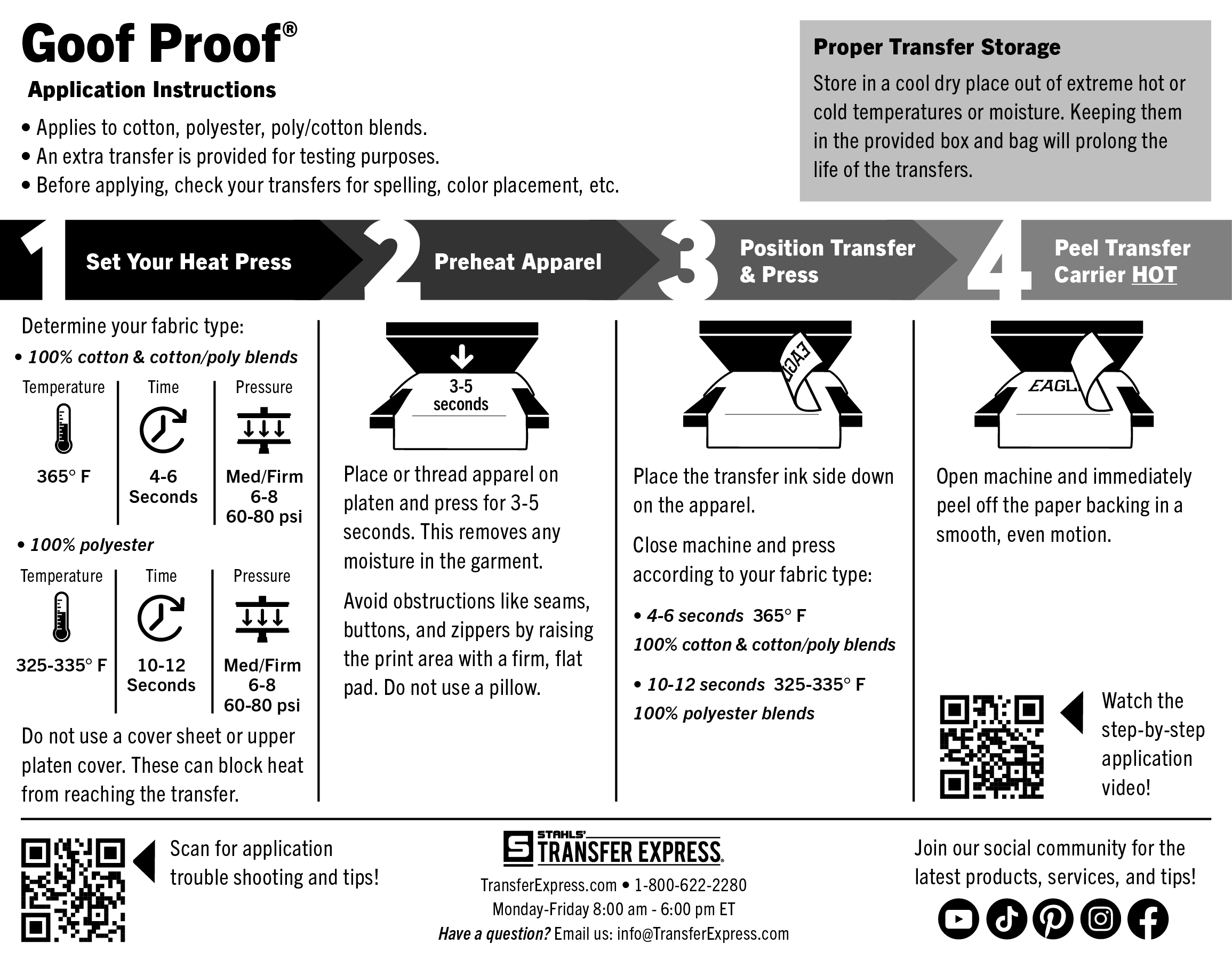
Set Temperature:
For Single Color - 100% cotton or cotton/poly blends: Set the press to 365°F.
For Single Color - 100% polyester: Set the press to 325-335°F.
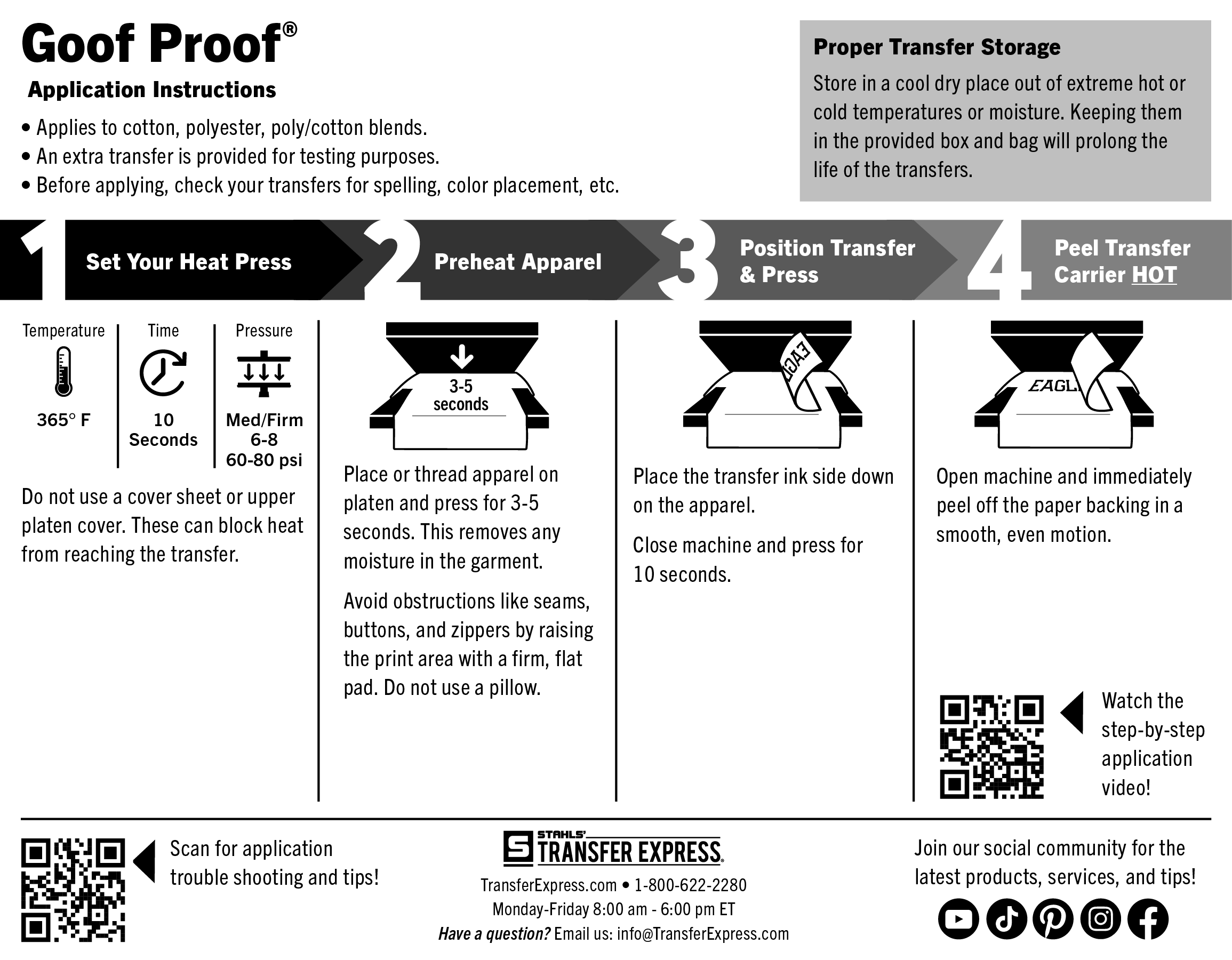
For Multi Color - cotton, poly, cotton/poly blends: Set the press to 365°F.
Pre-Heat Garment: First, place the garment on platen, heat press for 3-5 seconds or until there is no more steam to remove wrinkles and moisture. Ensure there are no obstructions such as buttons, pockets, or seams. If there are, raise only the print area with a Print Perfect Pad.
Position & Press: Place the transfer on the garment so that the ink side is facing down.
For Single Color - 100% cotton or cotton/poly blends (365°F): Close the heat press and heat for 4-6 seconds.
For Single Color - 100% polyester (325-335°F): Close the heat press and heat for 10-12 seconds.
For Multi Color - cotton, poly, or cotton/poly blends (365°F): Close the heat press and heat for 10 seconds.
Peel Hot: Open the press and peel the carrier in a smooth, even motion.
 Time: 4-6 Seconds
 Temperature: 365°F
 Pressure: Medium/Firm 6-8 (60-80 psi)
 Peel: Hot
Time: 10-12 Seconds
Temperature: 325-335°F
Pressure: Medium/Firm 6-8 (60-80 psi)
Peel: Hot
Time: 10 Seconds
Temperature: 365°F
Pressure: Medium/Firm 6-8 (60-80 psi)
Peel: Hot
Peel: Hot
Time: 10-12 Seconds
Temperature: 325-335°F
Pressure: Medium/Firm 6-8 (60-80 psi)
Peel: Hot
Time: 10 Seconds
Temperature: 365°F
Pressure: Medium/Firm 6-8 (60-80 psi)
Peel: Hot
Note: The recommended time, temperature, and pressure settings are for Stahls' Hotronix® heat press machines. Settings on other heat presses may vary.
- If applying to polyester that stretches or heat sensitive performance wear, Elasti Prints® will be a better option.
- If applying to sublimated garments, a transfer with a dye blocker will be a better choice, such as AquaTru®, Silicone, or UltraColor Stretch™ with Blocker, to block dye migration.
Pre-Production:
Please check transfers carefully before heat-applying.
Set Temperature:
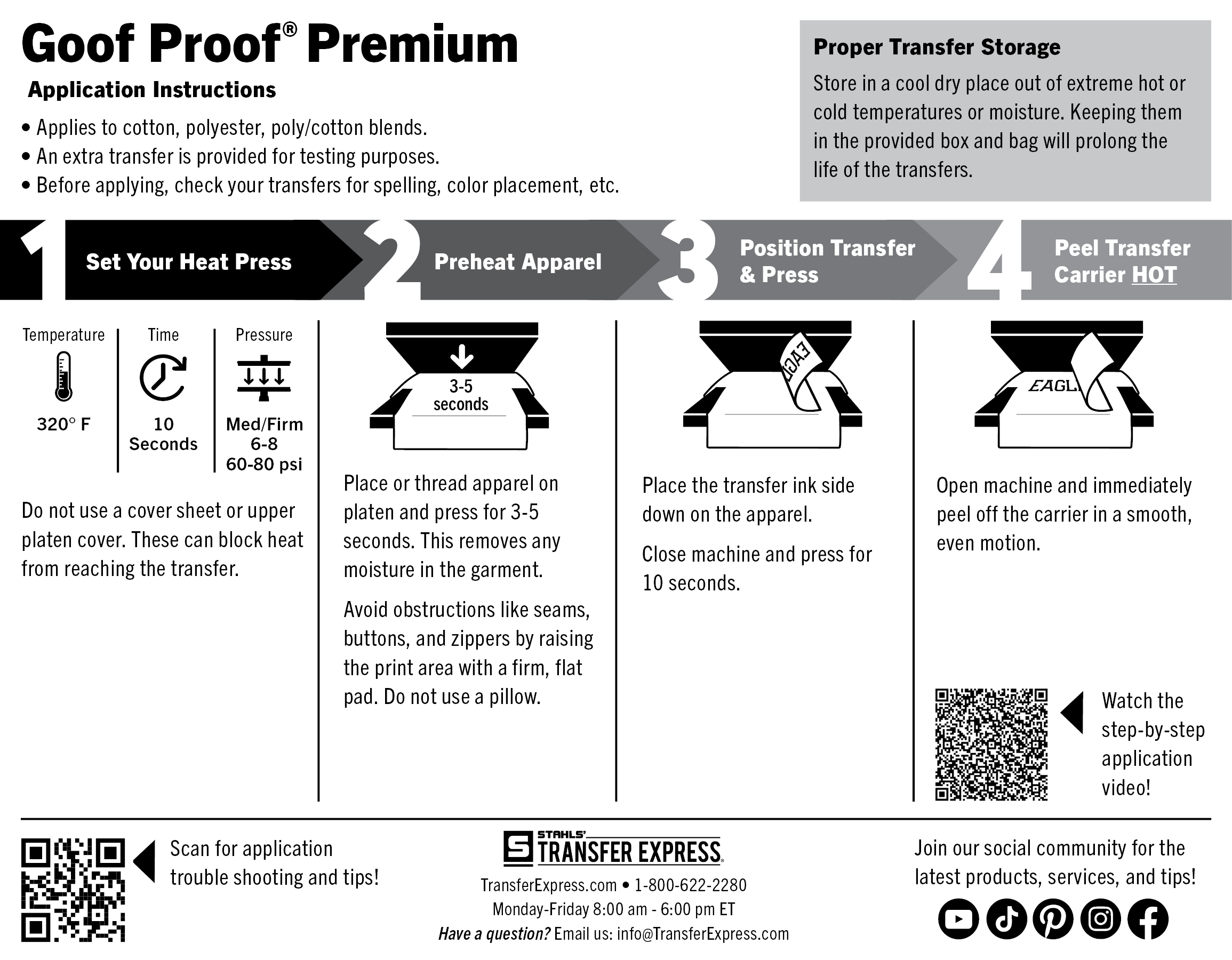
Set the press to 320°F
Pre-Heat Garment:
First, place the garment on platen, heat press for 3-5 seconds or until there is no more steam to remove wrinkles and moisture. Ensure there are no obstructions such as buttons, pockets, or seams. If there are, raise only the print area with a Print Perfect Pad.
Position & Press:
Place the transfer on the garment so that the ink side is facing down. Close the heat press and apply for 10 seconds.
Peel Hot:
Open the press and peel the carrier immediately within 1-2 seconds, in a smooth, even motion.
Time: 10 Seconds
Temperature: 320°F
Pressure: Medium/Firm 6-8 (60-80 psi)
Peel: Hot
Note: The recommended time, temperature, and pressure settings are for Stahls' Hotronix® heat press machines. Settings on other heat presses may vary.
 If you are experiencing static with the film carrier sticking to your heat press when it lifts, it is ok to use a paper cover sheet. When using a paper cover sheet, add 10 degrees.